PeepMD
Your Default Markdown Viewer
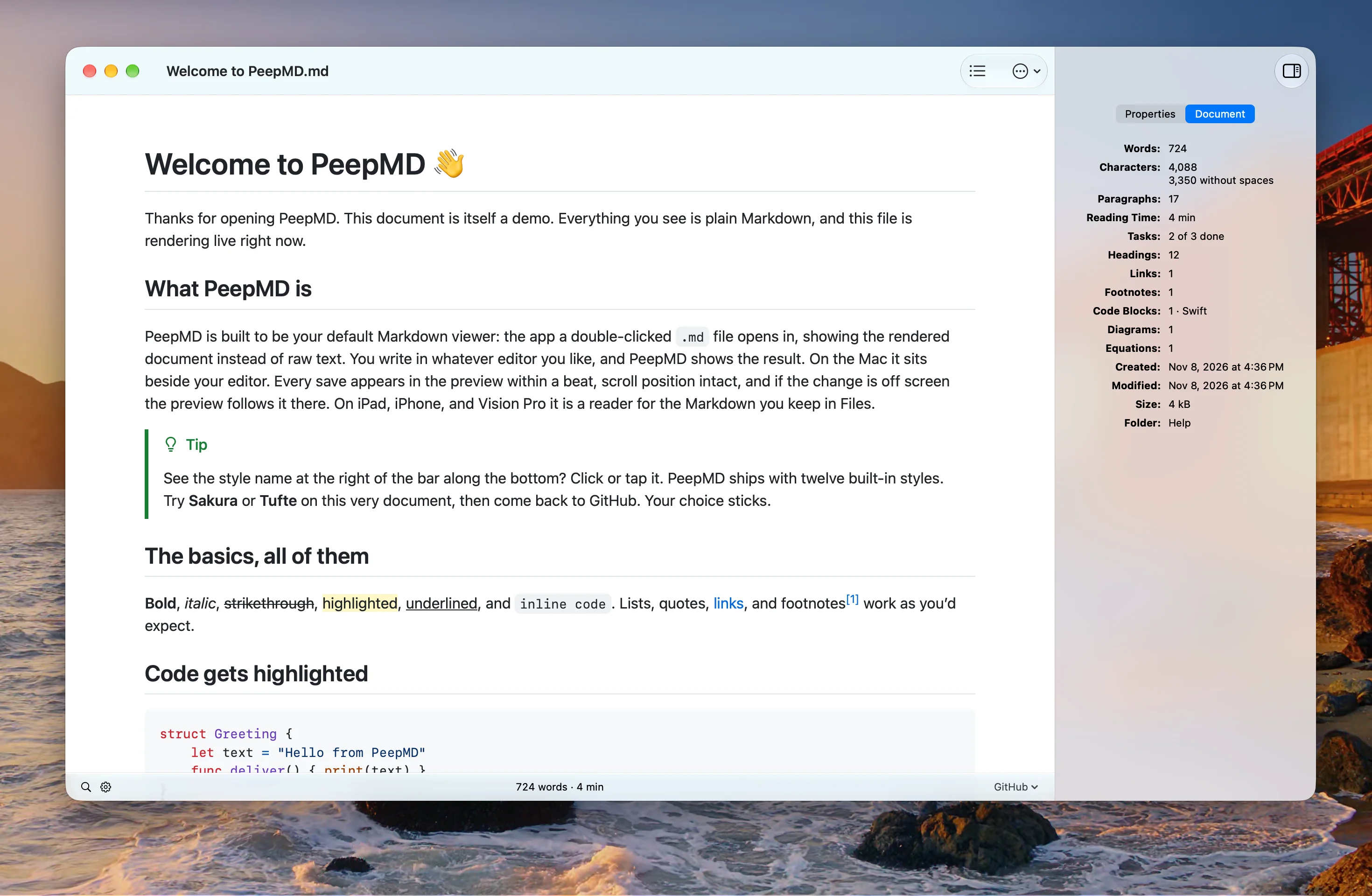
PeepMD is a native Markdown viewer for Mac, iPad, iPhone, and Apple Vision Pro, built to be the app your Markdown files open in. Write in any editor, and PeepMD renders the result and updates on every save, without losing your place.
PeepMD is in public beta on TestFlight. It comes to the App Store as one purchase for every device you own, with no subscription.
macOS, iPadOS, iOS, or visionOS 26 or later
Features
PeepMD shows the document, not the source, and keeps up with every save.
-
Live preview
Every save shows within a beat, with your scroll position held. An edit that lands off screen brings the preview to it.
-
Markdown, in full
GitHub Flavored Markdown with tables, task lists, and footnotes, plus highlights, callouts, CriticMarkup, and wiki links.
-
Diagrams, math, and code
Mermaid diagrams, TeX math, and syntax-colored code, all bundled in the app and all working offline.
-
Twelve styles
GitHub, Tufte, LaTeX, Sakura, and eight more, each in light and dark. Import your own CSS too.
-
Quick Look
Press Space in Finder to see the rendered page. File icons show the top of the page in Finder and in Files.
-
Front matter as properties
YAML or TOML front matter in the inspector, to edit, add, rename, and reorder, written back one line at a time.
-
Export and share
PDF, paginated or continuous, self-contained HTML, rich text, print, and email with the document as the message.
-
Every Apple device
One purchase for Mac, iPad, iPhone, and Apple Vision Pro, in English, French, German, Italian, Spanish, and Swedish.
Frequently asked questions
-
What does PeepMD run on?
A Mac with macOS 26 or later, an iPad with iPadOS 26, an iPhone with iOS 26, or an Apple Vision Pro with visionOS 26.
-
Is there a manual?
Yes. The manual covers every feature, in the same six languages as the app. It ships inside PeepMD too, under Help.
-
Which files does PeepMD open?
Markdown files ending in .md or .markdown, plain text ending in .txt, and TextBundle packages.
-
How do I make PeepMD my default Markdown viewer?
On the Mac, right-click any .md file in Finder, choose Get Info, set Open With to PeepMD, and click Change All… to make it the app for every Markdown file. From then on a double-click opens the rendered document. On iPad and iPhone, touch and hold a file in Files and choose Open With → PeepMD.
-
Does PeepMD edit my documents?
No. PeepMD is a reader: you write in the editor you like, and PeepMD shows the result on every save. It writes to a file in two cases only, a property you change in the inspector and a task you check off in the page, and it changes that one line and nothing else.
-
Does PeepMD work offline?
Yes. Mermaid diagrams, TeX math, and code coloring are bundled in the app, so a document renders the same on a plane. Only an image a document links from the web needs a connection.
-
Can I use my own style?
Yes. Import a .css file in Settings → Theme, or drop it in the styles folder. A style of your own with the name of a built-in one takes its place. The manual's Styles chapter shows how to write one.
-
What does PeepMD cost?
PeepMD will be one purchase on the App Store for Mac, iPad, iPhone, and Apple Vision Pro, with no subscription. Until the launch, the public beta on TestFlight is free.
-
How do I join the beta?
Open the TestFlight link on the device you want PeepMD on. Apple's TestFlight app installs the beta and its updates.
-
Is PeepMD available for Windows or Android?
No. PeepMD is built for Apple's devices, and for the Mac first.
PeepMD news by email
A mail from the developer when there is something new in PeepMD, the App Store launch first. Every mail has a link that takes you off the list.
Privacy Policy
Effective Date: November 8, 2026.
PeepMD is developed and operated by Michael Edlund (“we,” “our,” or “us”). This Privacy Policy explains what information PeepMD and this website handle, and who receives it.
1. Your Documents Stay on Your Device
- PeepMD renders your documents on your device. Your files, their names, and their contents are never sent to us or to anyone else.
- When a document shows an image from the web, PeepMD loads that image from its address, as a web browser would. That is the only network request PeepMD makes, and only when a document asks for it.
- The app contains no analytics, advertising, or tracking, and needs no account.
2. Purchases and Betas
- PeepMD is sold on the App Store, and Apple handles the purchase. We never see your payment details.
- If you join the beta on TestFlight, Apple shares the feedback and crash reports you choose to send. Apple's handling of your data is described in its own privacy policy.
3. This Website
- This website counts visits with a self-hosted copy of Umami, which stores no cookies and no personal data. It uses no advertising or tracking cookies.
4. News by Email
- If you sign up for PeepMD news, we store your email address, the language of the page you signed up on, and the time you confirmed. We record which mails went to your address.
- We send the mails through Mailgun, which processes your address to deliver them and tells us when a mail bounces. Mailgun's handling of your data is described in its own privacy policy.
- Every mail has a link that takes you off the list. We delete an address that signed up and never confirmed after 7 days.
5. Children’s Privacy
PeepMD is suitable for users of all ages and does not knowingly collect personal information from children under 13.
6. Your Rights
To see, correct, or delete the email list information we hold about you, contact contact@peepmd.com.
7. Changes to This Policy
We may update this Privacy Policy from time to time. The latest version will always be available at: https://peepmd.com/en#privacy